# Bettors

This page will run through the steps of placing bets in the OBM reference client, note that this interface is just one of many interacting with the betBlox protocol.&#x20;

Connect your web3 wallet or sign in with privy&#x20;

<figure><img src="/files/sr2MY533QLo19KhcPV6Y" alt=""><figcaption></figcaption></figure>

All contracts use USDC as the unit of account. Your connected account, wallet balance and preferred odds format  will show in the top right corner&#x20;

<figure><img src="/files/oNQ81uKnjeA7tIp1h8qs" alt=""><figcaption></figcaption></figure>

In 'Explore Markets' users can navigate what sports they want to browse&#x20;

<figure><img src="/files/NKO4S2AAQcO6HNsq1UzG" alt=""><figcaption></figcaption></figure>

Leagues with live events will have a parentheses () with the number of live events&#x20;

<figure><img src="/files/WztLwTtORIoENbIP6qIT" alt=""><figcaption></figcaption></figure>

If no markets have been created for the events you can create your own (see market maker section for more)

<figure><img src="/files/nQoNvM4uYQBEgIRlCSS3" alt=""><figcaption></figcaption></figure>

When markets have been created users can click 'Bet on markets'&#x20;

<figure><img src="/files/gGsn8VvbTaFkUq2QcXJG" alt=""><figcaption></figcaption></figure>

In the event view bettors can see the active markets and available liquidity. Toggle between 'Money Line', 'Spread' or Total.&#x20;

<figure><img src="/files/V5MjU4BRGzwHUotld8th" alt=""><figcaption></figcaption></figure>

To place a bet, tap the desired odds, put amount and hit Place Bet&#x20;

<figure><img src="/files/eJCzD9Mbl2VK7VEJ6uoK" alt=""><figcaption></figcaption></figure>

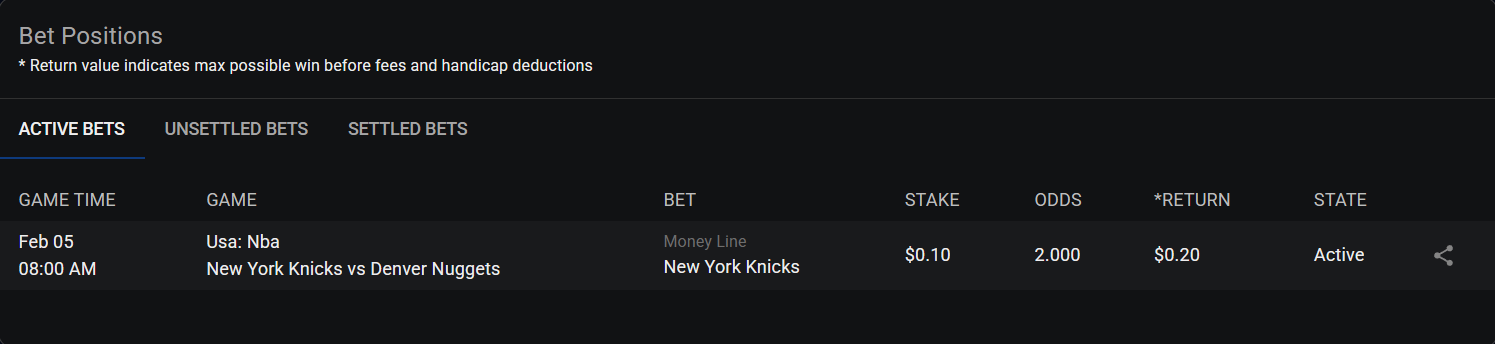
After the confirmation ticket with market, event and bet hash, the status of the bet can be found in the Positions tab under 'Active Bets'&#x20;

<figure><img src="/files/aCbSfM1zY2kCNz5yXKvO" alt=""><figcaption></figcaption></figure>

When the event has concluded, users will find the bet either within the 'Settled Bets' tab in case market maker has settled the event or inside 'Unsettled Bets' where the user can hit 'Payout' to settle the event

<figure><img src="/files/1hHvVvTf8jrRLN23e1gh" alt=""><figcaption></figcaption></figure>

<figure><img src="/files/oIOUVCvcM3mnTWlKz5o4" alt=""><figcaption></figcaption></figure>


---

# Agent Instructions: Querying This Documentation

If you need additional information that is not directly available in this page, you can query the documentation dynamically by asking a question.

Perform an HTTP GET request on the current page URL with the `ask` query parameter:

```
GET https://docs.betbase.xyz/obm-client/bettors.md?ask=<question>
```

The question should be specific, self-contained, and written in natural language.
The response will contain a direct answer to the question and relevant excerpts and sources from the documentation.

Use this mechanism when the answer is not explicitly present in the current page, you need clarification or additional context, or you want to retrieve related documentation sections.